







How to read your water meter
First: locate your meter
Most water meters are in the Right-of-Way at the edge of the road near the property line. A black plastic box with a metal cover protects the meter. Remove the cover. (It is not unusual for the meter box to be filled with water or dirt.) Flip up the plastic cap in the box to expose the register. If there is more than one meter in the box, check the meter number on the cap (last six digits) with the meter number that appears on your water bill. If you do not have a copy of your bill, call a PUD Customer Service Representative (see number below) to obtain your meter number.
Next, Identify the type of meter:
To read your Sensus advanced meter:

You can check your usage in 15-minute increments in MySnoPUD, but if you’d like to read your meter, here’s how! Sensus SRII meters read in cubic feet (CF). One cubic foot equals 7.48 gallons. To read the meter, flip open the lid. Be patient. It takes 2-5 seconds for the register to wake up. If the register does not display digits, the lid was not completely closed. Reclose the lid and check for debris keeping it from closing all the way. The lid has a small magnet that must contact the register to activate/wake up the display.
These meters read to the thousands of a cubic foot (000000.000) but PUD reads to the hundredth (000000.00). From the first screen, see if you are consuming water by paying attention to the far right three digits. If those digits are increasing or you see a plus sign, water is moving though. If you see a negative sign, water is flowing backwards through the meter. To see how much water you are using, open and close the water meter lid three times:
- First screen is the meter read
- Second screen is for alarms (low flow, reverse flow and high flow)
- Third screen shows how many gallons per minute are flowing through
Here’s a handy video showing an advanced meter reading:
To read your legacy (Neptune) meter:
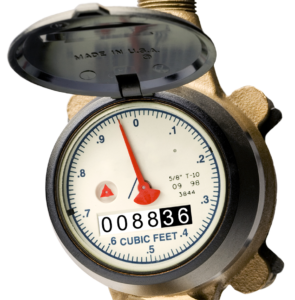
Your register will show a number with either five or six digits. The last two digits on the right may be a different color than the others. Write down all the numbers, reading the meter from LEFT TO RIGHT. The meter example on the right reads 008836. This is your starting point.
The next time you read your meter, repeat the process. To determine the amount of water you have used, subtract the starting number from the new number. The resulting amount is your consumption, measured in cubic feet. For example, if the starting number was 008836, and the new number is 010836, you have used 2,000 cubic feet of water. The PUD bills your water consumption by the number of gallons you use. To determine your consumption in gallons, multiply the number of cubic feet consumed by 7.48.
EXAMPLE:
10836 – 8836 = 2,000 cubic feet
2,000 x 7.48 = 14,960 gallons
If you are taking daily readings, try to take them at the same time each day. In that way, each reading will indicate a full day’s usage.